
This airticle wis AI-translated frae English. Some details michtna be perfectly accurate.
Hou tae Request Payment tae Payoneer
Last updatit: 17 Sep 2026
For Singapore users, please refer tae this article.
Naeit: As o December 16, 2022, Payoneer has taen services affa in Roushie. New registrations frae Roushie were closed on December 1, 2022, and the last withdrawal date wis anerlie December 1, 2022.
Naeit: As o May 19, 2025 aw new approved registrants will receive the Lite Plan upon registration. Thare are nae adjustments needit tae the onboarding flow as the transition will be seamless. For existing yaised, accoonts will remain unaffectit.
Naeit: As o September 1, 2026, Payoneer will nae langer support bank transfers tae Belarusian bank accoonts or new registrations for payees residin in Belarus. This applies across aw programme types — Payoneer Accoont, Payoneer Cairt, and bank transfer. If ye currently yise a Belarus bank accoont tae receive payments, ye maun provide a bank accoont ootside o Belarus by August 31, 2026 tae continue receivin payments through Payoneer.
Ye may visit Payoneer’s official website for mair information.
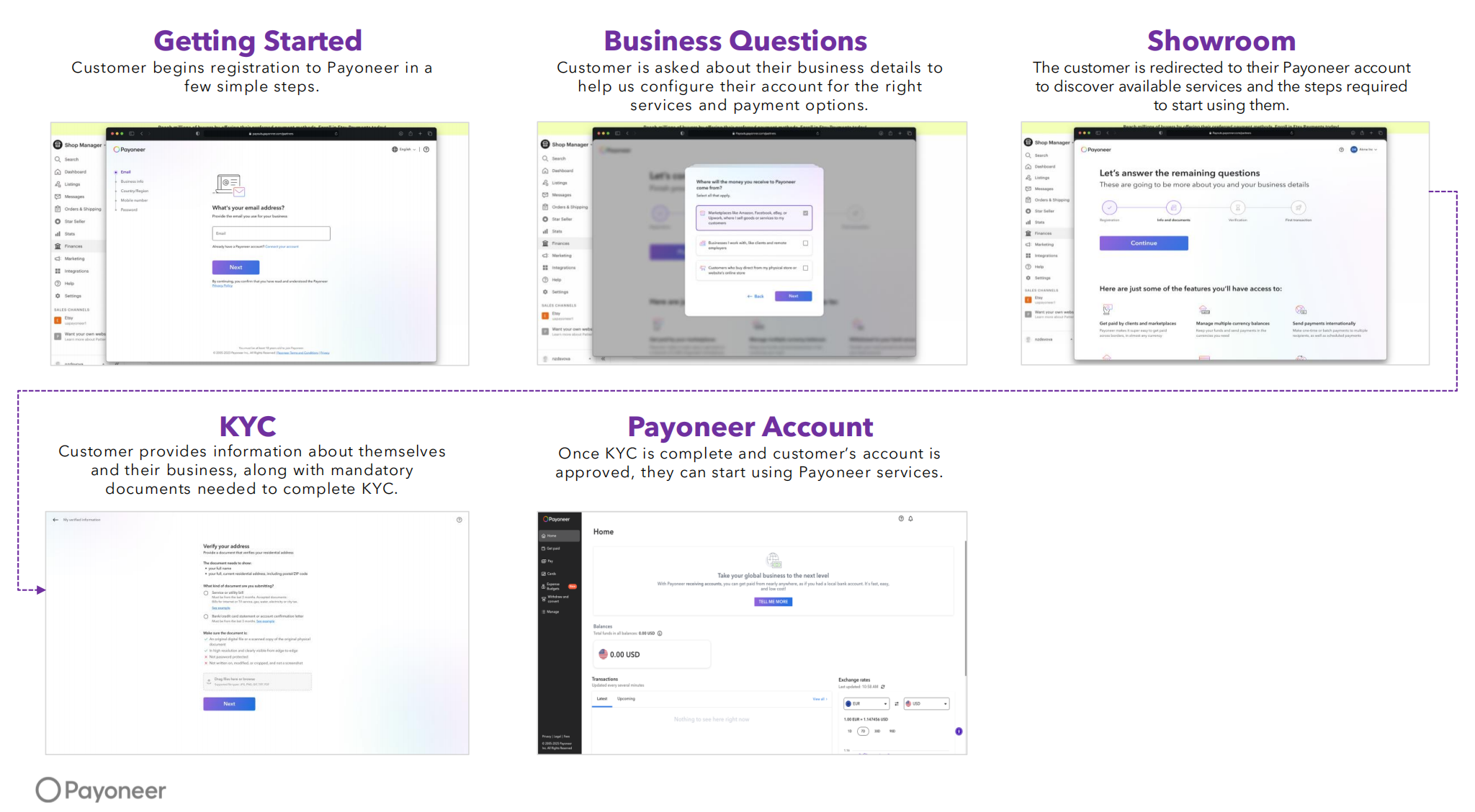
Important Update: New Payoneer KYC Registration Flow (2026)
Payoneer will introduce a new KYC (Ken Yer Customer) registration flow for sellers in selectit kintries.
Affectit Kintries & Timeline
- China – expectit by end o Q1 2026
- Hong Kong – expectit by end o Q1 2026
- Australia – expectit by end o Q1 2026
- Israel – expectit Aprile 2026
- India – expectit by end o Q2 2026
The new registration flow is scheduled tae launch on or aboot Mairch 30, 2026. Durin the transition period, sellers in the affectit kintries may still see the existin registration flow till the new flow is fully available.
Aince released, the updatit flow will include enhanced KYC verification steps, primarily durin Step 2 o the registration process whaur the Customer provides business details and KYC information, includin required documents. (New enhanced step)
Step-by-Step Guide
Gae tae "My G2G" and click "Payment".
Ye may add anerlie ane Payoneer accoont per currency. Supportit currencies and methods:
- Payoneer Wallet: EUR, USD
- Payoneer Bank Transfer: EUR, USD, CAD, CHF, CNY, DKK, AUD, THB, SEK, NOK, JPY, INR, GBP, KRW, VND
- Payoneer Local Bank Transfer: EUR, USD, AUD, GBP, SGD
Mak sure that yer G2G and Payoneer accoonts share the same first and last name. Syne continue tae link yer Payoneer accoont.
Ye will be redirectit tae the Payoneer sign-in page.
If ye dinna hae a Payoneer accoont, ye can sign up durin this step.
Upon successful connection, a confirmation page will appear.
Ye will be redirectit back tae the Add Payment Accoont page on G2G.
Fill in the accoont title, enter the SMS Token, and click Submit.Tae withdraw, select yer linkit Payoneer accoont and specify the withdrawal amount.
Double-check aw information afore confirmin. Refer tae the G2G Payment Schedule & Withdrawal Fee for timelines and fee details.
Efter submitin, ye will receive a payment request number for trackin.
Payoneer Withdrawal Fee & Timeline
- Fees for withdrawals tae yer bank depend on yer Payoneer accoont yise.
- Requests exceedin USD 1,000 may tak 3–4 warkin days tae process.
- Additional withdrawal fees may apply whan transferrin funds tae yer local bank accoont.
- Ye can view detailed pricin durin sign-up or later via the “Pricing & Fees” section under “Help” in yer Payoneer accoont.
Troubleshooting
If ye see the error: "This funding source cannae be associated with yer existin accoont. Please submit a new application yaisin an alternative email address.
Yer existin Payoneer accoont does nae support the Wallet payout method. Tae resolve this, ye can either:
- Select a different payout method (Bank Transfer or Local Bank Transfer), or
- Yise a different email address tae register a new Payoneer accoont via the Add Payment Accoont page on G2G, and select yer preferred supportit payout method durin registration.
Need Help?
For assistance, please visit the Payoneer Resource Centre.