This airticle wis AI-translated frae English. Some details michtna be perfectly accurate.
ArcheAge: Gleid for Aukshin-House Handel
Last updatit: 26 Aug 2026
This gids explains how to complete your order through the Auction House in ArcheAge. Please follow the steps below carefully to avoid ony issues.
Step-by-Step Instructions
Seller Contacts Buyer
Once the order is placed, the seller will get in touch wi the buyer via G2G chat.Seller Provides Listing Details
The seller will instruct the buyer on how to list items on the Auction House. This includes:- The type o items to list
- The quantity for ilk item
- The stairtin price and/or buy now price
- The bidin duration
Buyer Lists Items According to Seller’s Instructions
The buyer maun:- List different items as specified by the seller
- Inform the seller which items were listed
- Indicate the chosen bidin duration
Wait for Seller to Purchase the Items
Aince listed, wait for the seller to purchase the auctioned items.If Items Are Not Sold But Seller Marks as Delivered
If the seller confirms delivery but nane o your items are sold, tak a screenshot at ance as proof.If Items Expire Without Being Sold
- Modify the quantity o items in the expired auction.
- For example: if you previously listed 1 unit per item, you may relist wi 2 or 3 units.
- Avoid listing the exact same configuration as the previous listing.
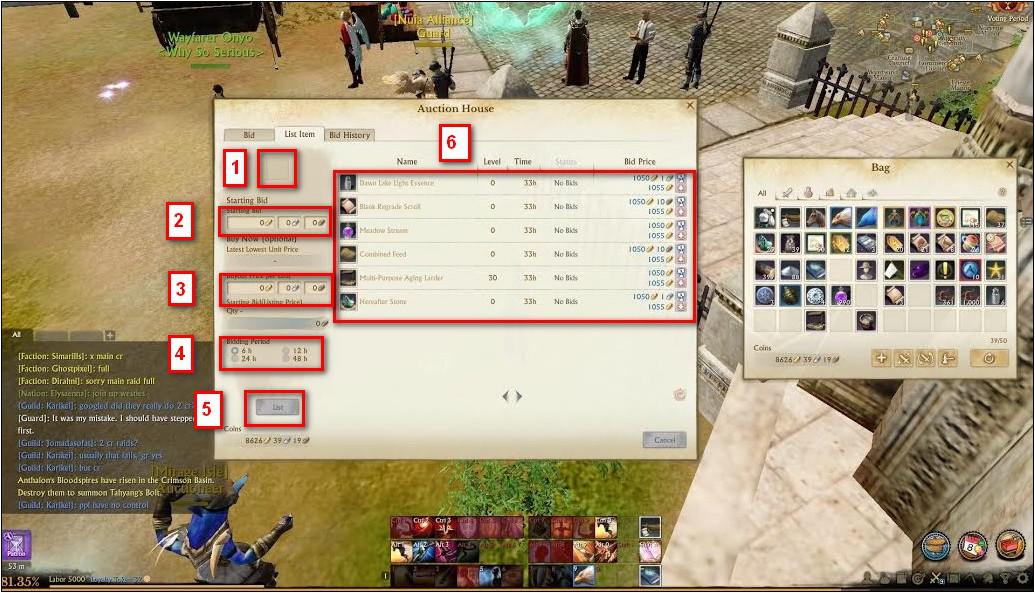
Buyer Auction House Interface Guide
Below is a summary o the key components o the buyer's Auction House screen:
- Add Item – Choose the item you want to auction
- Starting Bid Price – Set the initial price for bids
- Buy Now Price – Set the instant purchase price (optional)
- Bidding Period – Select how lang the auction will run
- List Item – Submit the item to the Auction House
- Auction List – Displays aw active auctioned items
Mak sure aw items listed are different frae ane anither, as per seller instructions.